Administration users can be created under a reseller to allow the reseller to log in to Cloudmore and manage their services, customers, pricing, and billing. A reseller administrator account can be assigned different roles to limit the user’s access and capabilities.
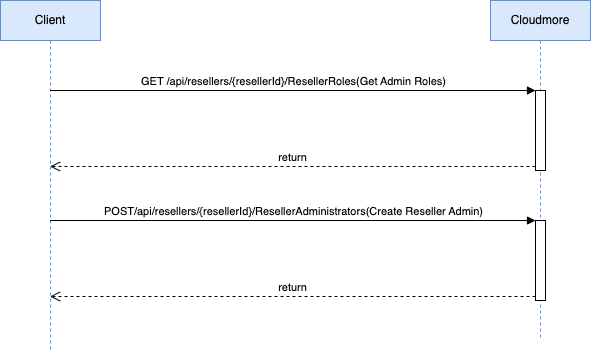
API Details
| ResellerAdministrators | |||
| Operation | Swagger Description | Method | API |
| Create an administrator | Creates new administrator for the reseller | POST | /api/resellers/{resellerId}/ResellerAdministrators |
| Return all administrators | Returns all reseller administrators | GET | /api/resellers/{resellerId}/ResellerAdministrators |
| Return an administrator | Returns reseller administrator details | GET | /api/resellers/{resellerId}/ResellerAdministrators/{id} |
| Update an administrator | Updates reseller administrator | PUT | /api/resellers/{resellerId}/ResellerAdministrators/{id} |
| Delete an administrator | Deletes reseller administrator | DELETE | /api/resellers/{resellerId}/ResellerAdministrators/{id} |
| ResellerRoles | |||
| Return all administrator roles | Returns all reseller administrator roles | GET | /api/resellers/{resellerId}/ResellerRoles |
API Examples
Returns All Reseller Administrator Roles
| Returns all reseller administrator roles | |
|---|---|
| End Point | /api/resellers/{resellerId}/ResellerRoles |
| HTTP Method | GET |
| Request Body | N/A. |
| Successful Example Response | 200[ { "id": 24, "name": "Global Admin" }, { "id": 3, "name": "Global Billing Admin" }, { "id": 25, "name": "Global Support Admin" }, { "id": 2, "name": "Global View Only Admin" }, { "id": 14, "name": "Key Account Manager" }, { "id": 26, "name": "Key Account View Only Manager" }, { "id": 17, "name": "Limited Key Account Manager" }, { "id": 18, "name": "Sales Agent" }, { "id": 1, "name": "Super Admin" } ] |
| Error Example Response | 404 |
Creates new administrator for the reseller.
| Creates new administrator for the reseller. | |
|---|---|
| End Point | /api/resellers/{resellerId}/ResellerAdministrators |
| HTTP Method | POST |
| Request Body | { "name": "johndoe@testddd.com", "firstName": "John", "lastName": "Doe", "displayName": "John Doe", "roleId": 24, "title": "Mr", "homePhone": "5678912", "homePhonePrefix": "372", "email": "saadick.dhansay12@cloudmore.com", "address": { "countryCode": "EE" }, "mfaOption": "1", "generatePassword": true, "cellPhone": "53564558", "cellPhonePrefix": "372" } |
| Successful Example Response | 201 |
| Error Example Response | 400{ "Name": [ "The Name field is required." ], "Email": [ "The Email field is required." ] }[ { "errorCode": 5, "errorName": "InvalidValue", "errorMessage": "Invalid country code" } ] |
API Field Definitions
| API Field | Description |
| name* | The username to be used. Must be an email address |
| password | Minimum password length is eight (8) characters. Password must contain uppercase and lowercase characters, numbers and non-word characters. Required unless GeneratePassword is set to true |
| firstName* | The first name of the user. |
| lastName* | The last name of the user. |
| displayName* | The display name of the user. |
| roleId* | The role to be assigned to the user All available roles can be retrieved from /api/resellers/{resellerId}/ResellerRoles |
| azureAdId | ID in Azure Active Directory (apply only for users import from AD) |
| title* | The users title. |
| homePhonePrefix | The users home number prefix. Only accepts digits from 0 to 9. Country calling code of the phone number without the ‘+’ mark. List of country calling codes |
| homePhone | The users home phone number. |
| department | The department the users belongs to. |
| office | The users office. |
| company | The users company. |
| email* | Administrator email address |
| address* | street – Users street address name and house number postalCode – User address postal code city – Users city countryCode* – ISO 3166 Alpha-2 country code of the user address https://www.iso.org/obp/ui/#search/code/ |
| mfaOption | Determines which multi-factor authentication method the user should use during login Email = 0 (default), SMS = 1 With the SMS option, the fields CellPhonePrefix and CellPhone become mandatory and must contain a valid number. |
| generatePassword | Use this field to auto-generate the administrator password If false or not set, a Password field is required. |
| cellPhonePrefix | The user’s home phone number. Only accepts digits from 0 to 9. |
| cellPhone | The user’s home phone number. Only accepts digits from 0 to 9. |